Creating your Car
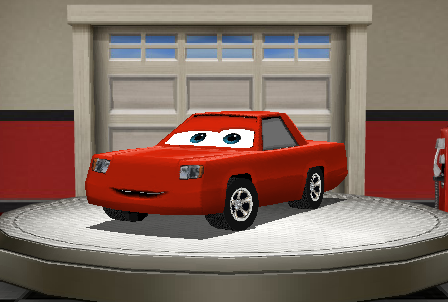 | During this game preview, players have the ability to create one car which they can race with on the test tracks. When you start you will have a randomly created car already on the turn-table, which you can customize and name. |
| During the entire Create you Car process, you will notice a set of buttons in the bottom left corner of the preview. These buttons allow you to change the view of the car you see. The outside buttons allow you to rotate the car on the turn-table, and the inner buttons allow you to switch between a side and top-down view. |  |
Making the Chassis

During the first step of the car making process, you will be given the option of selecting your car's gender and Chassis shape.
Gender
 | Moving from the left side of the Create a Car options to the right, you will first see the option to select your car's gender. The gender determines how your car's eyes look, and nothing more. |
Image:WoC_Create_My_Car_Boy.png | This is the shape of a boy car's eyes.
Image:WoC_Create_My_Car_Girl.png | This is the shape of a girl car's eyes.
Chassis shape
Most of the first step is based around editing the shape of your car's chassis. This feature has two parts, a basic and advanced option. Both these options can be used together to design a car unique to you!
Basic Chassis Options

The basic side of the Chassis editing process allows you to select the different styles of chassis, which can be further edited by using the advanced options feature.
Image: WoC_Create_My_Car_Chassis_Shape_One.png | This shape is achieved by selecting the option on the left.
Image: WoC_Create_My_Car_Chassis_Shape_Two.png | This shape is achieved by selecting the option in the middle.
Image: WoC_Create_My_Car_Chassis_Shape_Three.png | This shape is achieved by selecting the option on the right.
 | If you would like to further edit the shape of your car after you select a basic shape, click the advanced options button. |
Advanced Chassis Options

If you select that option, the pre-made selections will be replaced by a set of sliders. These allow you to select the length and height of certain parts of your car.
 | This slider adjusts the curve on the tail end of your car |
 | This slider adjusts the length of your car behind the back tire. |
 | This slider adjusts the length of your car in front of the back tire. |
 | This slider adjusts the length of the hood of your car. |
 | This slider adjusts the height of the back of your car's roof. |
 | This slider adjusts the height of the front of your car's roof. |
 | If you can't decide on a look you like for your car, you can always use the shuffle |
 | You can also go back to the basic options at any time if you want to change the shape of your car. |
Paint and Details

Now that you have the shape for your car in place, you can begin the customization process. This allows you to change such things as the paint color, paint scheme, and even the tires!
Tires
 | The first option you have is to change your tires. When creating your car, you may choose between two types of tires. |
| Name | Description | Image | Image on Car |
|---|
| White-Walled Tires | The Fettuccini Alfredo Tires. They scream, 'Look at me, here I am. Love me.' (More Items Coming in 2009!) |  |  |
| Black-Walled Racing Tires | Black-Walled Racing Tires. They blend in to the pavement. (More Items Coming in 2009!) |  |  |
Body Color
| This step also allows you to paint your car, in one of eight different colors. Each of these colors is listed below. |  |
| Name | Description | Image | Image on Car |
|---|
| Red Lightning | Is there any other color that signifies speed more? This is Ramone's favorite color. |  |  |
| Octagonal Orange | Octagonal Orange? Math Geeks love this color. This is Ramone's favorite color. |  |  |
| Not-So-Mellow Yellow | Inside or outside, this color's so bright, you better wear shades. This is Ramone's favorite color. |  |  |
| Chick Hicks Green | Could there be a color more suited to Chick Hicks? The answer is, 'No'. This is Ramone's favorite color. |  |  |
| DJ Blue | Subtle but sweet. A color favored by import tuners for years. This is Ramone's favorite color. |  |  |
| Powerhouse Purple | You might not be any faster, but you sure feel that way in this color. This is Ramone's favorite color. |  |  |
| Flamingo Pink | It's a lot like red, only lighter. This is Ramone's favorite color. |  |  |
| Gray Vee | If you had 5 cars in a row painted this color, would you have a Gray Vee train? This is Ramone's favorite color. |  |  |
Paint Job
 | Before moving on to the final step of creating your car, you have the option of choosing a special paint job for your car. |
| Name | Description | Image | Image on Car |
|---|
| None | None |  |  |
| Classic Racing Stripe | You could only be cooler if you had some gold rims, a spoiler and maybe a bigger exhaust pipe. (More Items Coming in 2009!) |  |  |
Name and Number

The final step in creating your car is to select a name and your racing number!
 | This step allows you to name your car by using a pre-selected list of names. The game requires you to choose both a first and last name, but there are so many options that every name can be unique! If you can't pick a name on your own, there is a shuffle option you can use that will select a name for you. |
| Since you are a racecar, you also have the option of selecting your racing number! You can pick a number anywhere from 0 to 99. When picking a number between 0 and 9, you have the option of having a 0 in front of it, such as 09 instead 9. |  |
Finishing Up
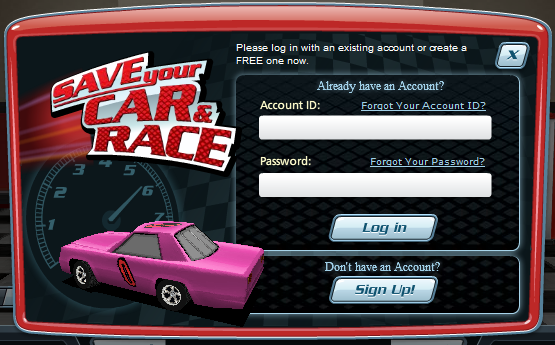 | When you save your car, you may have this screen pop up. Simply create an account or log in to an account you have for another Disney game and you'll be ready to join the world of cars to race! |


 During the first step of the car making process, you will be given the option of selecting your car's gender and Chassis shape.

 The basic side of the Chassis editing process allows you to select the different styles of chassis, which can be further edited by using the advanced options feature.

 If you select that option, the pre-made selections will be replaced by a set of sliders. These allow you to select the length and height of certain parts of your car.


 Now that you have the shape for your car in place, you can begin the customization process. This allows you to change such things as the paint color, paint scheme, and even the tires!


